Guía de estudio · Edición 2026
AWS Certified Cloud Practitioner (CLF-C02) — Complete Study Guide (2026)
The whole CLF-C02 blueprint — cloud concepts & the Well-Architected Framework, security & the shared responsibility model, core AWS services, and billing & pricing — taught plainly, with a service cheat-sheet so you can name each service by its one job.
- Extensión
- 80 páginas
- Preguntas de práctica en el libro
- 20
- Simulacro en línea de PrepPass
- 65 preguntas · 90 min
- Datos del examen verificados
- septiembre de 2026
- Archivo actualizado
- octubre de 2026
- Entrega
- PDF + EPUB · en inglés · descarga inmediata
Sobre este libro
Tarifa del examen: $100 por intento, que se paga a AWS. Repetir el examen vuelve a costarlo. Esta guía: $14.99, pago único.
Datos del examen, a quién le sirve y qué cambió
Sobre el examen en sí
| Organismo administrador | Amazon Web Services (AWS Certification) — examen administrado por Pearson VUE Fuente: AWS Certification — AWS Certified Cloud Practitioner (Exam overview) |
|---|---|
| Preguntas | 65 preguntas (50 calificadas, 15 de prueba sin calificar) Fuente: AWS — AWS Certified Cloud Practitioner (CLF-C02) Exam Guide |
| Tiempo límite | 90 minutos Fuente: AWS Certification — AWS Certified Cloud Practitioner (Exam overview) |
| Puntuación para aprobar | Puntuación escalada de 700 en una escala de 100–1,000 Fuente: AWS — AWS Certified Cloud Practitioner (CLF-C02) Exam Guide |
| Tarifas |
Fuente: AWS Certification — AWS Certified Cloud Practitioner (Exam overview) |
| Idiomas disponibles | Árabe · Inglés · Francés (Francia) · Alemán · Italiano · Japonés · Coreano · Portugués (Brasil) · Español (Latinoamérica) · Español (España) · Chino simplificado · Chino tradicional Fuente: AWS Certification — AWS Certified Cloud Practitioner (Exam overview) |
Mira dentro del libro
Tres páginas reales, renderizadas directamente del PDF que descargas — una página de referencia, una de explicación y una pregunta resuelta, siempre en ese orden. Nada se rediseñó para verse mejor.
- Referencia rápidaGlossary of AWS terms (~30) · Página 77 del PDF
Una página a la que puedes volver: cifras, plazos o términos reunidos en un solo lugar.
- Cómo se enseñaCHAPTER 2 — SECURITY AND COMPLIANCE · Página 25 del PDF
Una página de explicación: el material enseñado en prosa, en el orden en que lo evalúa el examen.
- Una pregunta resueltaCHAPTER 2 — SECURITY AND COMPLIANCE · Página 38 del PDF
Una pregunta de práctica con su respuesta y el razonamiento detrás — no solo la clave.
¿Examen en menos de dos semanas?
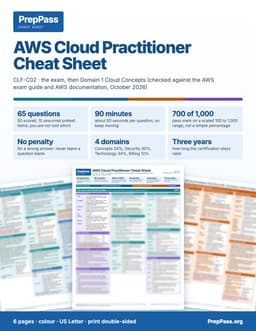
Esta guía es la enseñanza, para leer durante semanas. Si tu examen es en menos de dos semanas, la hoja de referencia a color imprimible es el otro producto: las cifras clave, por secciones.
6 páginas · US Letter · PDF imprimible · tuyo para siempre
Qué incluye — y qué no
Incluido
- All 4 domains at real weight, version-locked to CLF-C02
- The shared responsibility model made concrete (who secures what)
No incluido
- No se envía copia impresa — es un archivo que descargas y puedes imprimir tú
- El libro no incluye curso en vídeo, instructor ni tutorías — los vídeos gratis del sitio van aparte
Todo lo incluido y todo lo que no
Incluido
- A 40+ service cheat-sheet — each service by its single job
- Well-Architected's six pillars + the Cloud Adoption Framework
- 20 practice questions printed in the book, with explanations (400+ more free on the site)
- A ~30-term glossary + a 7-day study plan — PDF + EPUB
No incluido
- No incluye tu inscripción al examen ni la tasa del centro, que sigues pagando al organismo oficial
Contenido
Ver 5 secciones y la página en la que empieza cada una
- CHAPTER 1 — CLOUD CONCEPTSp. 8
- CHAPTER 2 — SECURITY AND COMPLIANCEp. 23
- CHAPTER 3 — CLOUD TECHNOLOGY AND SERVICESp. 39
- CHAPTER 4 — BILLING, PRICING, AND SUPPORTp. 60
- Glossary of AWS terms (~30)p. 77
Tomado del PDF que descargas, con la página en la que empieza cada uno — no escrito a mano aquí.
Lee un capítulo completo gratis
Un capítulo completo, tal como viene en el eBook. Desplázate en la ventana para leerlo aquí; sin descargas ni correo.
Lee el capítulo 3 aquí, sin salir de la página
No te dimos la introducción fácil — el capítulo gratis abre en una de las partes más exigentes del libro, para que juzgues la enseñanza donde el examen se pone difícil.
This is the biggest domain, and it is mostly recognition: given a need described in a sentence, name the AWS service (or infrastructure concept) that meets it. You will not be asked to configure anything, but you must know, on sight, that a fully managed NoSQL database is DynamoDB, that object storage is S3, that a virtual server is EC2, and that a content delivery network is CloudFront. This chapter is organized the way AWS organizes its services — global infrastructure, ways to interact, then compute, storage, databases, networking, and the integration/management tools that tie them together. Learn each service by the one job it is famous for.
Teach the concept: AWS global infrastructure
AWS runs on a global infrastructure with three layers you must understand to reason about availability and latency.
Regions. A Region is a separate geographic area (for example, N. Virginia, Ireland, Tokyo, São Paulo). Each Region is fully isolated from the others, which supports fault tolerance and data residency. You choose a Region based on four factors the exam tests directly:
- Compliance / data governance — laws may require data to stay in a particular country.
- Proximity to users (latency) — closer Regions mean faster response.
- Service and feature availability — not every service is in every Region.
- Pricing — costs differ from Region to Region.
Availability Zones (AZs). Within each Region are multiple Availability Zones, each one or more discrete data centers with independent power, cooling, and networking. AZs are physically separated (miles apart) but linked by high-speed, low-latency connections. Deploying across at least two AZs is the standard way to build high availability: if one AZ fails, an application spread across several keeps running. A Region always has multiple AZs — this multi-AZ design is what makes AWS resilient.
Edge locations. Separate from Regions and AZs, AWS operates a large global network of edge locations — sites used by content delivery (Amazon CloudFront) and DNS (Amazon Route 53) to cache content and answer requests close to users, reducing latency. There are many more edge locations than Regions.
Two extras worth recognizing:
- AWS Local Zones place compute and storage close to a specific metro area for very low latency there.
- AWS Outposts bring AWS infrastructure and services into the customer's own on-premises data center for hybrid, low-latency, or data-residency needs.
Concrete examples
- "A German company must keep customer data inside Germany." Choose a Region located in Germany (compliance/data-governance driver).
- "How do we survive the loss of a single data center?" Deploy across multiple Availability Zones in the Region (high availability).
- "Users worldwide complain that a website loads slowly." Serve content from edge locations via CloudFront to cut latency.
Teach the concept: ways to interact with AWS
There are three primary ways to reach AWS services, plus infrastructure-as-code on top.
- AWS Management Console — a web-based graphical interface; best for learning, exploration, and one-off tasks.
- AWS Command Line Interface (CLI) — control services with typed commands and scripts; ideal for automation and repeatable operations from a terminal.
- AWS SDKs (Software Development Kits) — call AWS services programmatically from application code in languages such as Python, Java, JavaScript, .NET, and Go.
For repeatable provisioning, infrastructure as code (IaC) tools such as AWS CloudFormation define resources in templates so an entire environment can be created, updated, and torn down consistently — no clicking required.
Teach the concept: compute services
Compute is where your code and applications actually run. Learn the four main options and when each fits.
Amazon EC2 (Elastic Compute Cloud) — resizable virtual servers (instances) where you control the operating system, installed software, and configuration. It is the flexible, general-purpose choice and the classic IaaS example. Because you manage the instance, you patch the OS and scale capacity. EC2 offers instance families tuned for different workloads:
- General purpose — balanced CPU/memory (web servers, small databases).
- Compute optimized — high CPU (batch processing, gaming servers).
- Memory optimized — lots of RAM (in-memory databases, analytics).
- Storage optimized — high, fast local disk (data warehouses, big data).
- Accelerated computing — GPUs/specialized hardware (machine learning, graphics).
To make EC2 elastic and resilient:
- Amazon EC2 Auto Scaling adds and removes instances automatically to match demand.
- Elastic Load Balancing (ELB) distributes incoming traffic across healthy instances so none is overwhelmed and failures are bypassed. (Types include Application Load Balancer for HTTP/HTTPS, Network Load Balancer for high-performance TCP/UDP, and Gateway Load Balancer.)
AWS Lambda — serverless compute: you upload a function, and Lambda runs it in response to events, automatically scaling and charging only for the compute time consumed (measured in milliseconds), with no charge when the code is not running and no servers to manage. Ideal for short, event-driven tasks (process a file uploaded to S3, respond to an API call). Lambda is the exam's favorite illustration of both serverless and pay only for what you use.
Containers — package an application with its dependencies so it runs consistently anywhere.
- Amazon ECS (Elastic Container Service) — AWS's own container orchestration.
- Amazon EKS (Elastic Kubernetes Service) — managed Kubernetes.
- AWS Fargate — serverless compute for containers, so you run containers without managing the underlying EC2 hosts.
- Amazon ECR (Elastic Container Registry) — stores container images.
AWS Elastic Beanstalk — a PaaS that deploys and manages web applications for you: you upload code and Beanstalk handles capacity provisioning, load balancing, scaling, and health monitoring, while you keep control of the underlying resources. Great when you want to run an app without managing the platform yourself.
Other compute worth recognizing: AWS Batch (large-scale batch jobs), Amazon Lightsail (simple virtual private servers with predictable pricing for small apps and websites).
Concrete examples
- "We need full control of the OS to run a legacy application." → Amazon EC2.
- "Run a small piece of code whenever a file lands in S3, and pay nothing when idle." → AWS Lambda.
- "Run Docker containers but not manage any servers." → AWS Fargate.
- "Just upload our web app and let AWS handle deployment, scaling, and load balancing." → AWS Elastic Beanstalk.
Key-service callout — Compute - EC2 = virtual servers, you control the OS (IaaS). Auto Scaling = elastic instance count. ELB = distribute traffic across healthy targets. - Lambda = serverless functions, event-driven, pay per millisecond, no servers. - ECS/EKS = container orchestration; Fargate = serverless containers; ECR = image registry. - Elastic Beanstalk = PaaS, deploy an app without managing the platform. Lightsail = simple, low-cost VPS.
Teach the concept: storage services
AWS storage comes in three shapes — object, block, and file — plus archival. Matching the shape to the need is the core skill.
Amazon S3 (Simple Storage Service) — object storage: data is stored as objects in buckets, accessed over the internet via a URL/API, with essentially unlimited capacity and eleven 9s (99.999999999%) of durability. S3 is ideal for backups, static website hosting, data lakes, media, logs — any large collection of files. It is not a drive you mount to a server; it is accessed over HTTP. S3 offers storage classes to balance cost against access frequency:
- S3 Standard — frequent access; highest storage cost, lowest access cost.
- S3 Intelligent-Tiering — automatically moves objects between tiers based on usage; good when access patterns are unknown.
- S3 Standard-Infrequent Access (Standard-IA) and One Zone-IA — cheaper storage for less-frequently-accessed data (One Zone-IA keeps a single AZ copy).
- S3 Glacier Instant Retrieval / Flexible Retrieval / Deep Archive — very low-cost archival; retrieval ranges from instant to hours (Deep Archive is cheapest, slowest).
Lifecycle policies transition objects to cheaper classes automatically as they age.
Amazon EBS (Elastic Block Store) — block storage volumes that attach to a single EC2 instance, behaving like a virtual hard disk. Used for operating systems, databases, and any workload needing persistent, low-latency block storage. An EBS volume lives in one Availability Zone; you back it up with snapshots stored in S3. Volume types include SSD-backed (gp3, io2) and HDD-backed for throughput.
Amazon EFS (Elastic File System) — a shared file system that many Linux EC2 instances can mount at the same time, scaling elastically as files are added and removed. Suits shared content and workloads needing a common file store across instances. (For Windows or high-performance computing, Amazon FSx provides managed file systems, including FSx for Windows File Server and FSx for Lustre.)
Moving data into AWS:
- AWS Snow Family (e.g., Snowball) — physical devices shipped to you for offline transfer of large data volumes when networks are too slow.
- AWS Storage Gateway — connects on-premises applications to AWS storage.
- AWS DataSync — automates online data transfer to AWS.
The one-line contrast to memorize: S3 = object storage over the internet; EBS = block storage for one instance; EFS = shared file storage for many instances; Glacier = cheap archival.
Concrete examples
- "Store millions of images for a website, accessed over the web, with near-infinite scale." → Amazon S3.
- "A persistent disk for the operating system and database of a single EC2 instance." → Amazon EBS.
- "A shared file system mounted by twenty Linux instances at once." → Amazon EFS.
- "Archive compliance records for seven years at the lowest possible cost; retrieval in hours is fine." → S3 Glacier Deep Archive.
- "Move 80 TB to AWS but the internet link would take months." → AWS Snowball.
Key-service callout — Storage - S3 = object storage, buckets, over the internet, 11 nines durability; classes from Standard to Glacier Deep Archive; Intelligent-Tiering auto-moves data. - EBS = block storage, one EC2 instance, single AZ, snapshots to S3. - EFS = shared file storage, many Linux instances. FSx = managed Windows/Lustre file systems. - Snow Family = offline bulk transfer devices. Storage Gateway / DataSync = on-prem-to-cloud transfer.
Teach the concept: database services
AWS offers managed databases so you avoid installing, patching, backing up, and scaling engines yourself. Match each to its data model.
Amazon RDS (Relational Database Service) — managed relational databases supporting engines MySQL, PostgreSQL, MariaDB, Oracle, SQL Server, and Amazon Aurora. AWS handles provisioning, patching, backups, and failover. Multi-AZ deployments keep a standby replica in another AZ for high availability; read replicas offload read traffic. Use RDS for structured data with schemas and transactions — orders, accounting, inventory.
Amazon Aurora — a MySQL- and PostgreSQL-compatible relational database built for the cloud, offering higher performance and durability than the standard engines, storing six copies of data across three AZs. Aurora Serverless scales capacity automatically.
Amazon DynamoDB — a fully managed, serverless NoSQL key-value and document database delivering single-digit-millisecond performance at any scale, with no servers to manage and automatic scaling. Ideal for high-traffic web/mobile apps, gaming, IoT, and workloads with flexible or rapidly changing data. When a question says "fully managed NoSQL database that scales to any size," the answer is almost always DynamoDB.
Amazon ElastiCache — managed in-memory caching (Redis or Memcached) that accelerates read-heavy applications by keeping frequently accessed data in memory, reducing load on the primary database.
Amazon Redshift — a managed data warehouse optimized for analytics (OLAP) — complex queries over very large datasets for business intelligence and reporting, not day-to-day transactions.
Purpose-built databases to recognize:
- Amazon Neptune — graph database (relationships, social networks, fraud graphs).
- Amazon DocumentDB — document database (MongoDB-compatible).
- Amazon Keyspaces — Apache Cassandra-compatible.
- Amazon MemoryDB — durable in-memory database.
- Amazon Timestream — time-series data (IoT/metrics).
Migrating databases: AWS Database Migration Service (DMS) moves databases into AWS with minimal downtime; the Schema Conversion Tool helps convert between engines.
Concrete examples
- "A managed PostgreSQL database with automatic backups and a standby in another AZ." → Amazon RDS (Multi-AZ).
- "A serverless NoSQL store for a mobile game with millions of players and millisecond reads." → Amazon DynamoDB.
- "Speed up a read-heavy site by caching results in memory." → Amazon ElastiCache.
- "Run complex analytical reports over billions of rows." → Amazon Redshift.
Key-service callout — Databases - RDS = managed relational (MySQL, PostgreSQL, etc.); Multi-AZ = HA standby; read replicas = scale reads. - Aurora = cloud-built relational, MySQL/PostgreSQL-compatible, high performance. - DynamoDB = fully managed NoSQL, serverless, any scale, single-digit-ms. - ElastiCache = in-memory caching (Redis/Memcached). Redshift = data warehouse (analytics). - DMS = database migration with minimal downtime.
Preguntas frecuentes
¿Cómo lo recibo?
Paga y la descarga aparece en esta página al instante. Los enlaces también se te envían por correo. No hace falta cuenta.
¿Y si no es para mí?
Escríbenos dentro de 14 días para un reembolso total, sin preguntas.
¿Va a desaparecer la práctica gratis?
No. Todas las preguntas, el simulacro cronometrado y los capítulos gratis del sitio siguen gratis. Este libro es la mitad de estudio, no una valla alrededor de lo gratuito.
Más preguntas (1)
¿Puedo leerlo en el móvil?
Sí — el EPUB es para móviles y e-readers, el PDF para imprimir y marcar. Recibes ambos.
¿Por qué comprar el libro si la práctica es gratis?
Nuestras preguntas de práctica y el simulacro cronometrado siguen gratis: nada del sitio se esconde tras este libro. El libro de $14.99 es la mitad de estudio: el material en sí, explicado en orden, en un archivo tuyo.
- Enseñanza sistemática — cada sección del examen explicada capítulo a capítulo, de principio a fin, no solo preguntas
- Imprímelo y márcalo — un PDF listo para papel que puedes resaltar, anotar y llevar a tu mesa de estudio
- Estudia en cualquier lugar, sin conexión — EPUB en tu teléfono o e-reader; sin wifi, sin pestañas
- Todo en un solo lugar — los capítulos y las preguntas de práctica en un archivo
- Tuyo de por vida — pago único de $14.99, descarga instantánea, sin suscripción
Los detalles
- Verificado con la fuente oficial(the public AWS CLF-C02 exam guide)
- 420 preguntas de práctica gratis
Un AWS Cloud Practitioner bootcamp/course cuesta $300–$1,200. Este libro enseña el mismo examen — las mismas reglas, verificadas a los estándares actuales — por un pago único de $14.99 que conservas de por vida.
Compra única, acceso de por vida a la descarga. El eBook es la guía completa de AWS Certified Cloud Practitioner (CLF-C02) en PDF y EPUB. Resumen educativo, no asesoría profesional ni legal — confirma siempre las reglas vigentes con la fuente oficial. Última actualización: October 2026.