Study guide · 2026 Edition
AWS Solutions Architect Associate (SAA-C03) — Complete Study Guide (2026)
PrepPass's independent 2026 study guide for the AWS Solutions Architect Associate exam is 86 pages including 20 practice questions with a full answer key, PDF + EPUB, $14.99 one-time; it is not affiliated with the exam provider.
- Length
- 86 pages
- Practice questions in the book
- 20
- Exam facts last checked
- September 2026
- File last updated
- October 2026
- Delivery
- PDF + EPUB · English · instant download
What is in the AWS Solutions Architect Associate (SAA-C03) study guide?
The real exam: AWS Certified Solutions Architect – Associate (SAA-C03) — 65 questions (50 scored, 15 unscored pretest) · 130 minutes · Passing score: Scaled score of 720 on a 100–1,000 scale.
The SAA-C03 exam taught the way it's tested — all four domains (secure, resilient, high-performing, cost-optimized) with the decision heuristics for choosing the right AWS service in each scenario.
Exam fee: $150 per attempt, paid to AWS. A retake pays it again. This guide: $14.99, one time.
Exam facts, who it suits and what changed
About the exam itself
| Administering body | Amazon Web Services (AWS Certification) — exam delivered by Pearson VUE Source: AWS Certification — AWS Certified Solutions Architect - Associate (Exam overview) |
|---|---|
| Questions | 65 questions (50 scored, 15 unscored pretest) Source: AWS — AWS Certified Solutions Architect - Associate (SAA-C03) Exam Guide |
| Time limit | 130 minutes Source: AWS Certification — AWS Certified Solutions Architect - Associate (Exam overview) |
| Passing score | Scaled score of 720 on a 100–1,000 scale Source: AWS — AWS Certified Solutions Architect - Associate (SAA-C03) Exam Guide |
| Fees |
Source: AWS Certification — AWS Certified Solutions Architect - Associate (Exam overview) |
| Languages offered | English · French (France) · Italian · Japanese · Korean · Portuguese (Brazil) · Spanish (Latin America) · Spanish (Spain) · Simplified Chinese · Traditional Chinese Source: AWS Certification — AWS Certified Solutions Architect - Associate (Exam overview) |
Look inside the book
Three real pages, rendered straight from the PDF you download — a reference page, a teaching page, and a worked question, always in that order. Nothing here was redrawn to look better.
- Quick referenceChapter 4 — Design Cost- Optimized Architectures · PDF page 86
A page you can turn back to: the numbers, deadlines or terms gathered in one place.
- How it's taughtChapter 2 — Design Resilient Architectures · PDF page 36
An explanation page: the material taught in prose, in the order the exam tests it.
- A question, workedChapter 1 — Design Secure Architectures · PDF page 25
A practice question with its answer and the reasoning behind it — not just a key.
Exam inside two weeks?
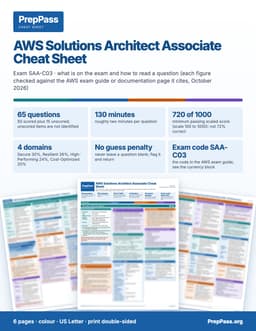
This guide is the teaching, read over weeks. If your exam is inside two weeks, the printable colour cheat sheet is the other product: the figures the exam turns on, laid out by section.
See the AWS Solutions Architect Associate cheat sheet PDF — $9.99 →
6 pages · US Letter · printable PDF · yours to keep
What's included — and what isn't
Included
- All 4 SAA-C03 domains at real weight: secure, resilient, performant, cost-optimized
- Decision heuristics: which AWS service fits each scenario (and why others don't)
Not included
- No printed copy is shipped — this is a file you download and can print yourself
- No video course, instructor or tutoring comes with the book — the free videos on the site are separate
Everything included, and everything that isn't
Included
- 60+ service cheat-sheet (service → when to use)
- Worked scenario walk-throughs in the exam's own 'MOST…' style
- 20 scenario practice questions printed in the book — plus 400+ more with explanations free on the site
- Current AWS naming (gp3, Aurora Serverless v2, OAC, Savings Plans) — PDF + EPUB
Not included
- Not your exam registration or the testing centre's fee, which you still pay to the official body
Contents
See 4 sections and the page each one starts on
- Chapter 1 — Design Secure Architecturesp. 9
- Chapter 2 — Design Resilient Architecturesp. 27
- Chapter 3 — Design High- Performing Architectures The two instincts that answer most performancep. 44
- Chapter 4 — Design Cost- Optimized Architecturesp. 62
Taken from the PDF you download, with the page each one starts on — not typed here.
Read a chapter free, in full
One complete chapter, exactly as it ships in the eBook. Scroll the window to read it right here; no download, no email.
Read chapter 2 here, without leaving the page
We didn't give you the easy intro — the free chapter opens on one of the hardest-working parts of the book, so you can judge the teaching where the exam gets difficult.
The foundation: Regions, Availability Zones, and multi-AZ thinking
AWS is organized into Regions (geographic areas) each containing multiple Availability Zones (AZs) — physically separate data centers with independent power and networking, connected by low-latency links. The single most important resilience reflex on the whole exam is: to survive the loss of an Availability Zone, deploy across at least two (ideally three) AZs. A stateless fleet in a single AZ is a wrong answer whenever "must survive an AZ failure with no manual intervention" appears.
This reflex shows up everywhere: load balancers span multiple AZs; Auto Scaling groups place instances in multiple AZs; RDS Multi-AZ keeps a standby in another AZ; NAT gateways must be deployed one per AZ (not a single shared one) to survive an AZ failure.
Elastic Load Balancing: which balancer, and why it matters for health
Elastic Load Balancing (ELB) distributes incoming traffic across targets in multiple AZs and — critically for resilience — performs health checks, routing only to healthy targets and pulling unhealthy ones out of rotation. When a scenario says "an instance is unhealthy but still receiving traffic and causing errors," the fix is the load balancer's health check removing it.
Know the three balancers and when each wins:
- Application Load Balancer (ALB) — layer 7 (HTTP/HTTPS). Supports path-based and host-based routing (
/apito one target group,/imagesto another behind one entry point), and is the default for web applications and containers. Reflex: "HTTP path/host routing" → ALB. - Network Load Balancer (NLB) — layer 4 (TCP/UDP). Handles millions of requests per second at ultra-low latency, preserves the client source IP, and provides a static IP per AZ. Reflex: "extreme throughput / TCP / static IP / preserve source IP" → NLB.
- Gateway Load Balancer (GWLB) — for deploying third-party network virtual appliances (firewalls, IDS/IPS) transparently. Reflex: "insert third-party security appliances inline" → GWLB.
A subtle resilience feature: cross-zone load balancing distributes traffic evenly across all healthy targets in all AZs even when AZs have different target counts. And a common startup bug the exam tests: an Auto Scaling group keeps terminating instances that are still booting because they fail the ALB health check during startup — the fix is a health check grace period long enough to let instances finish initializing.
Auto Scaling: self-healing and elasticity
EC2 Auto Scaling maintains a desired number of healthy instances, automatically replacing any that fail health checks and scaling capacity up or down with demand. The canonical resilient, elastic web tier is: an Auto Scaling group spanning multiple AZs behind an Application Load Balancer, with a minimum of two instances and scaling policies on a metric like average CPU. This pattern is the answer to a huge family of questions: "automatically replace unhealthy instances and adjust to demand," "survive an AZ failure with no manual intervention," "keep at least two instances running and scale on CPU."
Two scaling nuances the exam tests:
- Target tracking keeps a metric (e.g., 50% CPU) at a set point — the simplest, most common policy.
- When scaling reacts too slowly to sharp surges, step scaling or a shorter evaluation, and warm pools, help capacity match sudden demand faster.
Decoupling: SQS, SNS, and EventBridge
Decoupling is a resilience superpower: if tiers communicate through a durable intermediary instead of calling each other directly, a spike or an outage in one tier can't cascade. Three services, three distinct patterns:
- Amazon SQS (Simple Queue Service) — a queue: one producer writes messages, one consumer (or one consumer group) pulls and processes them at its own pace. It absorbs spikes (the queue buffers), prevents lost work (a message stays until processed and deleted), and lets the processing tier scale on queue depth. Reflex: "decouple so a spike doesn't overwhelm the processing tier" or "never lose an order if the downstream is temporarily down" → SQS. Standard queues give best-effort ordering and at-least-once delivery; FIFO queues guarantee exact ordering and exactly-once processing (deduplication) — choose FIFO when the scenario says "strict order" and "no duplicates," e.g., a payment workflow.
- Amazon SNS (Simple Notification Service) — pub/sub fan-out: one published message is delivered to many subscribers at once (email, SQS queues, HTTPS webhooks, Lambda). Reflex: "several independent systems must each receive a copy of the event" or "fan one message out to email + a queue + a webhook" → SNS. The classic fan-out pattern is SNS → multiple SQS queues, giving each consumer its own durable buffer.
- Amazon EventBridge — an event bus that routes events from AWS services and SaaS partners to different targets based on content rules and schemas, with no polling infrastructure. Reflex: "route events by content to different targets, from AWS and SaaS sources, serverless" → EventBridge.
Two more messaging details:
- A dead-letter queue (DLQ) isolates "poison" messages that repeatedly fail processing, so they stop blocking the queue and can be inspected later. Reflex: "messages failing endlessly and blocking the queue" → configure a DLQ.
- AWS Step Functions orchestrates multi-step workflows with retries, error handling, branching, and even waits for human approval. Reflex: "coordinate a sequence of steps reliably with retries and error handling" → Step Functions.
Resilient databases: RDS Multi-AZ, read replicas, Aurora, and DynamoDB
The database is where "read the constraint carefully" pays off most, because Multi-AZ and read replicas solve different problems and the exam loves to swap them:
- RDS Multi-AZ is for high availability / failover. It keeps a synchronous standby in another AZ and automatically fails over to it (typically within a minute or two) if the primary or its AZ fails, with no data loss on committed transactions. The standby does not serve reads — its only job is standby. Reflex: "automatic failover to another AZ with minimal downtime" → Multi-AZ.
- RDS read replicas are for read scaling, not automatic failover. They offload read-heavy or reporting queries from the primary via asynchronous replication. A team surprised that a primary failure caused downtime "even though we have read replicas" has confused the two — the fix is to add Multi-AZ. When a scenario wants both to offload reporting reads and survive an AZ loss, the answer combines a read replica for scale + Multi-AZ for failover (or Aurora, below).
- Amazon Aurora is AWS's cloud-native MySQL/PostgreSQL-compatible engine that stores six copies of data across three AZs, self-heals storage, and fails over to a replica in seconds. Aurora replicas serve reads and act as failover targets (up to 15 of them). Reflex: "MySQL/PostgreSQL-compatible, six copies across three AZs, fast automated failover, scale reads" → Aurora.
- Amazon DynamoDB is a fully managed NoSQL database that is inherently multi-AZ. Its resilience headline feature is global tables — active-active multi-Region replication so each Region accepts local writes with single-digit-millisecond latency and replicates to the others. Reflex: "low-latency reads and writes to users in multiple Regions, each Region accepts writes" → DynamoDB global tables. Point-in-time recovery (PITR) lets you restore to any second in a recent window after a bad data change.
For RDS specifically, automated backups with point-in-time recovery let you recover to any point within the retention window after an accidental bad change — a different tool than Multi-AZ (which is about availability, not undo).
Resilient storage: S3 durability, versioning, and replication
Amazon S3 stores objects redundantly across multiple facilities (AZs) within a Region, giving very high durability (the famous "eleven nines" design) and protection against the loss of a single facility. Resilience features to know:
- Versioning — keeps every version of an object so accidental overwrites or deletes are recoverable; a delete just adds a delete marker and the prior version can be restored. Reflex: "recover from accidental overwrite/delete" → enable versioning.
- MFA Delete — requires a second authentication factor before any object version can be permanently removed, guarding versioned buckets against malicious/accidental permanent deletion.
- Cross-Region Replication (CRR) — automatically copies objects to a bucket in another Region for DR/compliance; enabling it also lets you backfill existing objects via an S3 Batch Replication job. Same-Region Replication (SRR) copies within a Region. Reflex: "objects written in us-east-1 must be copied to eu-west-1" → CRR.
Amazon EFS and shared file systems for resilience
When many instances across multiple AZs must share the same files concurrently, the resilient answer is Amazon EFS — a fully managed, elastic, multi-AZ NFS file system that any number of Linux instances can mount at once and that scales storage automatically. Reflex: "shared POSIX file system mounted by an Auto Scaling group across AZs, survives an AZ failure" → EFS. (EBS volumes attach to a single instance in a single AZ and are the wrong answer for multi-instance sharing; see Chapter 3 for EBS.)
Route 53: DNS-level resilience and failover
Amazon Route 53 is DNS with health checks and multiple routing policies that provide availability at the DNS layer:
- Failover routing — active-passive: send all traffic to the primary while its health check passes, and automatically switch to a standby (often in another Region) when the primary fails. Reflex: "active-passive, fail over to a standby endpoint automatically" → failover routing + health checks.
- Latency-based routing — send each user to the Region giving them the lowest latency. Reflex: "route users to the lowest-latency Region." (Performance, but often paired with resilience.)
- Multivalue answer routing — return several healthy IPs at once, omitting any that fail health checks, for simple client-side spreading and improved availability. Reflex: "return multiple healthy records, drop unhealthy ones."
- Weighted routing — split traffic by assigned weights (blue/green, canary).
- Geolocation / geoproximity — route by user location.
Common thread: Route 53 health checks detect endpoint failure and stop returning the failed endpoint, steering users to healthy ones.
Disaster recovery: matching strategy to RTO and RPO
The exam expects you to know the four DR strategies and to pick by RTO (how fast you must recover), RPO (how much data loss is tolerable), and cost, ordered from cheapest/slowest to costliest/fastest:
- Backup and restore — cheapest; back up data and redeploy from scratch on disaster. High RTO/RPO (hours). For when downtime is tolerable.
- Pilot light — a minimal core (e.g., a replicated database) runs in the second Region; the rest is provisioned on failover. Lower RTO than backup/restore, modest cost.
- Warm standby — a scaled-down but running full copy in the second Region, scaled up on failover. Faster RTO, higher cost.
- Multi-site active-active — full capacity running in two Regions simultaneously; a Regional failure is nearly invisible (lowest RTO/RPO). Costliest.
Reflex: "modest RTO/RPO without running full duplicate capacity" → pilot light (or warm standby). "Lowest possible RTO/RPO, willing to pay for full capacity in two Regions, failure nearly invisible" → multi-site active-active.
AWS Backup centrally schedules, enforces, and audits backups with consistent retention across EBS, RDS, DynamoDB, EFS, and more. Reflex: "centrally manage and audit backups across many services with retention policies" → AWS Backup.
Worked scenario — durability guarantees and protecting against permanent deletion
A company stores critical objects in S3 Standard and wants to understand what protects them against the loss of a single facility, and separately wants any accidental permanent deletion of a version to require a second authentication factor. What is correct?
Two facts combine. On durability: S3 Standard stores objects redundantly across multiple facilities (Availability Zones) within the Region, giving its very high (eleven-nines) design durability and protecting against the loss of any single facility automatically — nothing extra to configure. On accidental-deletion protection: enabling versioning makes overwrites and deletes recoverable (a delete just adds a delete marker), and layering MFA Delete on the versioned bucket requires a second authentication factor before any version can be permanently removed. So the pairing is versioning + MFA Delete for deletion protection, on top of S3's built-in multi-facility durability. A common distractor is "replicate to another Region for facility protection" — replication is for Regional DR and compliance, not for single-facility protection within a Region, which S3 already provides.
For block storage, the parallel durability tool is the EBS snapshot: point-in-time, incremental backups stored in S3, from which a volume can be restored (in the same or another AZ, and copied cross-Region for DR). When a scenario needs to protect or migrate EBS data, snapshots are the mechanism; AWS Backup or Data Lifecycle Manager automates their schedule and retention.
Questions buyers ask
How do I get it?
Pay, and the download appears on this page straight away. The links are also emailed to you. No account is required.
What if it isn't for me?
Email us within 14 days for a full refund, no questions asked.
Is the free practice going away?
No. Every practice question, the timed mock and the free chapters on this site stay free. This book is the studying half, not a gate around the free half.
More questions (15)
Can I read it on my phone?
Yes — the EPUB is for phones and e-readers, the PDF is for printing and tabbing. You get both.
Is a study guide enough for the AWS Solutions Architect Associate (SAA-C03) exam, or do I need a course?
A book is exam review: it does not replace any education, training or experience Amazon Web Services (AWS Certification) requires before you may sit the exam, so check those requirements first. For the exam content itself, this 86-page guide teaches the material chapter by chapter with 20 practice questions and explanations inside, and 400 more practice questions are free on PrepPass. A prep course adds live instruction and a set schedule; whether you need one beyond any required education is your call.
What is the cheapest way to prepare for the AWS Solutions Architect Associate (SAA-C03) exam?
Start with what costs nothing: 400 practice questions on PrepPass, with explanations and no signup. If you want it taught in one file you keep, the full study guide is $14.99 once; the printable cheat sheet for the last days is $9.99. No subscription on any of them.
Who administers the AWS Certified Solutions Architect – Associate (SAA-C03)?
Amazon Web Services (AWS Certification) — exam delivered by Pearson VUE. Taken at a Pearson VUE testing center or as an online proctored exam. Content Domain 1: Design Secure Architectures 30%; Domain 2: Design Resilient Architectures 26%; Domain 3: Design High-Performing Architectures 24%; Domain 4: Design Cost-Optimized Architectures 20% (of scored content).
How many questions are on the AWS Certified Solutions Architect – Associate (SAA-C03)?
65 questions (50 scored, 15 unscored pretest). Multiple choice or multiple response. The 15 unscored questions are not identified on the exam, and unanswered questions count as incorrect.
How long is the AWS Certified Solutions Architect – Associate (SAA-C03)?
130 minutes
What is the passing score for the AWS Certified Solutions Architect – Associate (SAA-C03)?
Scaled score of 720 on a 100–1,000 scale. AWS uses a compensatory scoring model: you need to pass the exam as a whole, not each section.
How much does the AWS Certified Solutions Architect – Associate (SAA-C03) cost?
$150 — Exam fee (AWS, per attempt). AWS points to its Exam pricing page for foreign-exchange rates and other costs.
What languages is the AWS Certified Solutions Architect – Associate (SAA-C03) offered in?
English · French (France) · Italian · Japanese · Korean · Portuguese (Brazil) · Spanish (Latin America) · Spanish (Spain) · Simplified Chinese · Traditional Chinese. AWS says the Italian version of this exam will be retired after December 31, 2026.
Does the AWS Solutions Architect Associate (SAA-C03) study guide come as a PDF?
Yes — AWS Solutions Architect Associate (SAA-C03) — Complete Study Guide (2026) downloads as PDF and EPUB, 86 pages. The download link is emailed the moment payment clears and does not expire.
How much does the AWS Solutions Architect Associate (SAA-C03) study guide cost?
$14.99, once. There is no subscription and no account to create; the PDF and EPUB files are yours to keep.
Are there free AWS Solutions Architect Associate (SAA-C03) practice questions?
Yes — 400 of them, free to use with no signup and an explanation on every one. They are separate from this study guide, which is what you are buying here. The same free, no-account system also has practice modes (adaptive, new questions, spaced review of misses, weak-topic focus, saved, my mistakes); a timed mock exam (50 questions, 130 minutes) with a score report by topic; a 10-question readiness check (about 5 minutes); 4 study chapters. None of it needs this study guide.
Can I read part of the AWS Solutions Architect Associate (SAA-C03) study guide before buying?
Yes. A full chapter is free to read on this page — not a summary of one, the chapter itself.
What is the difference between the AWS Solutions Architect Associate (SAA-C03) study guide and the cheat sheet?
The study guide ($14.99) teaches the material chapter by chapter and is meant to be read over weeks. The cheat sheet ($9.99, 6 pages) drops the teaching and keeps the figures: every number on the exam grouped by value so the confusable ones sit together, each reference page paired with a recall page that blanks the answers, and four routes by days left — 14, 7, 3, or tonight. They are separate purchases; neither replaces the other.
Is this the official AWS Solutions Architect Associate (SAA-C03) study guide?
No. This is an independent study guide and is not affiliated with or endorsed by the exam's awarding body. It is written from the public AWS SAA-C03 exam topics. Always confirm current requirements with the body that issues your licence.
Why buy the book when the practice is free?
Our practice questions and timed mock stay free — nothing on the site moves behind this book. The $14.99 book is the studying half: the material itself, taught in order, in a file you own.
- Systematic teaching — every exam section explained chapter by chapter, start to finish, not just questions
- Print it & tab it — a paper-ready PDF you can highlight, mark up, and bring to your study table
- Study anywhere, offline — EPUB on your phone or e-reader; no wifi, no browser tabs
- Everything in one place — the chapters and the practice questions in one file
- Yours for life — one-time $14.99, instant download, no subscription
The details
- Verified from the official source(the public AWS SAA-C03 exam topics)
- 400 free practice questions
An AWS Solutions Architect bootcamp/course runs $500–$2,000. This book teaches the same exam — same rules, verified to current standards — for a one-time $14.99 you keep for life.
Also free on PrepPass for AWS Solutions Architect Associate (SAA-C03)
Beside this guide, PrepPass has a free study system for the same exam. It needs no account, and buying the guide does not unlock or change it: 400 practice questions with explanations; practice modes (adaptive, new questions, spaced review of misses, weak-topic focus, saved, my mistakes); a timed mock exam (50 questions, 130 minutes) with a score report by topic; a 10-question readiness check (about 5 minutes); 4 study chapters.
Progress is saved in your browser; a free account keeps it across devices. The readiness gauge reflects your own practice, not a prediction of the real exam result. How the practice works
One-time purchase, lifetime access to the download. The eBook is the full AWS Solutions Architect Associate (SAA-C03) study guide in PDF and EPUB. Educational summary, not professional or legal advice — always confirm the current rules with the official source. Last updated: October 2026.