Study guide · 2026 Edition
CompTIA A+ Core 1 (220-1101) — Study Guide for the retired V14 exam
PrepPass's independent 2026 study guide for the CompTIA A+ Core 1 exam is 75 pages including 100 practice questions with a full answer key, PDF + EPUB, $14.99 one-time; it is not affiliated with the exam provider. The book does not include PrepPass's separate online timed mock for this exam (90 questions, 90 minutes).
- Length
- 75 pages
- Practice questions in the book
- 100
- PrepPass online timed mock
- 90 questions · 90 min
- Exam facts last checked
- September 2026
- File last updated
- October 2026
- Delivery
- PDF + EPUB · English · instant download
What is in the CompTIA A+ Core 1 (220-1101, retired V14) study guide?
The real exam: CompTIA A+ Core 1 (220-1201) — Questions: Up to 90 questions · 90 minutes · Passing score: Scaled score of 675 on a 100–900 scale.
Covers the 220-1101 objectives. CompTIA retired 220-1101/1102 in September 2025; the exams offered now are 220-1201 and 220-1202.
Exam facts, who it suits and what changed
About the exam itself
| Administering body | CompTIA Source: CompTIA — A+ Core 1 V15 (220-1201) certification page, Exam details |
|---|---|
| Questions | Up to 90 questions Source: CompTIA — A+ Core 1 V15 (220-1201) certification page, Exam details |
| Time limit | 90 minutes Source: CompTIA — A+ Core 1 V15 (220-1201) certification page, Exam details |
| Passing score | Scaled score of 675 on a 100–900 scale Source: CompTIA — A+ Core 1 V15 (220-1201) certification page, Exam details |
| Fees | Not checked |
| Languages offered | English · German · Japanese Source: CompTIA — A+ Core 1 V15 (220-1201) certification page, Exam details |
Look inside the book
Three real pages, rendered straight from the PDF you download — a reference page, a teaching page, and a worked question, always in that order. Nothing here was redrawn to look better.
- How it's taughtAnswer Key with Explanations · PDF page 69
An explanation page: the material taught in prose, in the order the exam tests it.
- How it's taughtAnswer Key with Explanations · PDF page 70
An explanation page: the material taught in prose, in the order the exam tests it.
- How it's taughtAnswer Key with Explanations · PDF page 74
An explanation page: the material taught in prose, in the order the exam tests it.
Exam inside two weeks?
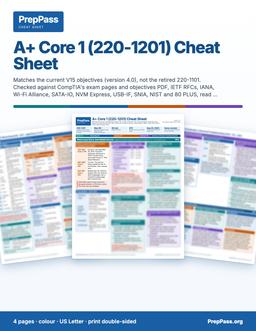
This guide is the teaching, read over weeks. If your exam is inside two weeks, the printable colour cheat sheet is the other product: the figures the exam turns on, laid out by section.
See the CompTIA A+ Core 1 cheat sheet PDF — $9.99 →
4 pages · US Letter · printable PDF · yours to keep
What's included — and what isn't
Included
- Written against 220-1101 (retired Sept 2025) — not 220-1201
- All 5 domains, weighted like 220-1101 (Troubleshooting 30%)
Not included
- No printed copy is shipped — this is a file you download and can print yourself
- No video course, instructor or tutoring comes with the book — the free videos on the site are separate
Everything included, and everything that isn't
Included
- Ports, RFC 1918 ranges, CIDR/subnet, and Wi-Fi standards reference
- RAID levels, DDR generations, connectors, and storage specs
- Worked troubleshooting walk-throughs (APIPA, no-POST, cloud models)
- 100 original practice questions with answer explanations
- PDF (print & tab it) + EPUB (phone / e-reader)
Not included
- Not your exam registration or the testing centre's fee, which you still pay to the official body
Contents
See 2 sections and the page each one starts on
- Part II — Full Practice Exam (100 Questions)p. 44
- Answer Key with Explanationsp. 65
Taken from the PDF you download, with the page each one starts on — not typed here.
Read a chapter free, in full
One complete chapter, exactly as it ships in the eBook. Scroll the window to read it right here; no download, no email.
Read chapter 4 here, without leaving the page
We didn't give you the easy intro — the free chapter opens on one of the hardest-working parts of the book, so you can judge the teaching where the exam gets difficult.
Introduction
Virtualization and cloud computing let organizations run workloads flexibly instead of buying a physical server for every job. This is the smallest domain on Core 1, but it is conceptual rather than fact-dense, so it rewards clear understanding over memorization. This chapter explains the hypervisor and the two types of it, the difference between containers and virtual machines, the three cloud service models, and the deployment models and shared characteristics that shape planning.
The through-line is abstraction and sharing: virtualization abstracts one physical machine into many logical ones, and cloud computing sells that capacity as a metered, on-demand service. Each concept is a step up the ladder of "how much does someone else manage for you."
Virtualization basics
Virtualization abstracts physical hardware so multiple operating systems can run on one machine. The hypervisor is the software layer that makes this possible.
- The hypervisor manages VMs. It abstracts the hardware and allocates CPU, memory, and storage to each virtual machine. Firmware, drivers, and bootloaders are low-level components but they do not manage VMs — the hypervisor does.
- Type 1 runs on bare metal. A Type 1 (bare-metal) hypervisor installs directly on the hardware, with no host OS beneath it, for maximum performance — the enterprise data-center pattern.
- Type 2 runs on a host OS. A Type 2 (hosted) hypervisor runs as an application on top of an existing operating system — the way you run a test VM on a laptop.
- Isolation aids testing. VMs isolate environments, so a lab or a piece of development work does not affect the host — a safe sandbox.
Type 1 vs. Type 2 — the trade-off. A bare-metal (Type 1) hypervisor gives better performance and stronger isolation because nothing sits between it and the hardware; it is what data centers use. A hosted (Type 2) hypervisor is more convenient — you install it like any app on a working desktop — at the cost of the overhead of the underlying OS. Convenience versus performance is the whole distinction.
Containers vs. virtual machines
Containers are a lighter alternative to full VMs: they isolate applications while sharing the host's kernel instead of each carrying a whole operating system.
- Containers share the host kernel. They package an app with its dependencies so it runs consistently across environments, without bundling a full OS.
- VMs include a full guest OS. Each VM carries its own operating system, which makes it heavier than a container.
- Containers start fast and scale well. Their light footprint suits microservices and rapid deployment.
- Choose based on isolation needs. Full VMs give stronger isolation; containers give density and speed. That is the design decision.
Cloud service models
Cloud providers deliver computing at different levels of abstraction, from raw infrastructure up to finished applications. The higher you go, the more the provider manages for you.
- IaaS — Infrastructure as a Service. You get virtual compute, storage, and networking and manage them yourself. Most control, most responsibility.
- PaaS — Platform as a Service. You deploy applications onto a managed platform without managing the underlying OS and servers. The provider handles the plumbing; you handle the app.
- SaaS — Software as a Service. You use a fully managed application — webmail, an online office suite — through a browser. Least to manage, least control.
- Responsibility shifts by model. Moving from IaaS → PaaS → SaaS hands more of the management burden to the provider and leaves you less to run.
Cloud deployment and characteristics
Beyond what is delivered, clouds differ in who owns them, and they share defining traits that guide planning.
- Public clouds are multi-tenant. A provider hosts shared infrastructure used by many customers.
- Private clouds are dedicated. Infrastructure serves a single organization for control and compliance.
- Hybrid combines both. A hybrid cloud links on-premises and public resources so workloads can move between them. (A community cloud, by contrast, is shared among several related organizations — not the same as hybrid.)
- Elasticity and measured service. Elasticity means resources scale up or down automatically with demand; measured service means usage is metered so customers pay for what they consume (pay-as-you-go).
Resource planning. Before creating multiple VMs on a host — or sizing a cloud deployment — the resource that matters is the host's available CPU cores, RAM, and storage, and for an individual VM the administrator tunes its allocated vCPUs and RAM in the hypervisor. Over-committing beyond what the host can supply is what turns a tidy virtualization plan into a slow one.
Key facts & specs
Every item in this box is drawn from this book's source material for the virtualization and cloud domain.
| Concept | Fact to remember |
|---|---|
| Hypervisor | Software layer that creates and manages VMs; allocates CPU/RAM/storage |
| Type 1 | Bare-metal — installs directly on hardware; enterprise performance |
| Type 2 | Hosted — runs as an app on an existing OS |
| Container | Shares the host kernel; lightweight, fast, portable |
| Virtual machine | Carries a full guest OS — heavier; stronger isolation |
| IaaS | Infrastructure — you manage compute/storage/networking |
| PaaS | Platform — deploy apps without managing OS/servers |
| SaaS | Software — fully managed apps in a browser (e.g., webmail) |
| Public cloud | Multi-tenant, shared by many customers |
| Private cloud | Dedicated to one organization |
| Hybrid cloud | Links on-premises + public so workloads can move |
| Elasticity | Resources scale automatically with demand |
| Measured service | Usage metered — pay for what you use |
| VM sizing | Adjust vCPUs and RAM; verify host CPU/RAM/storage first |
Worked example — matching the model to the need
"We want fully managed email our staff just log into in a browser." That is a finished application — SaaS. "Our developers want to push code to a managed platform without patching servers." Platform, no OS management — PaaS. "We need virtual machines and virtual networks we control and configure ourselves." Raw infrastructure — IaaS. "Keep sensitive workloads in our own data center but burst to a public provider at peak." On-prem plus public, workloads moving between them — a hybrid deployment. The tell is always how much you want to manage yourself (IaaS most, SaaS least) and who owns the infrastructure (private, public, or hybrid).
Common traps
- Swapping Type 1 and Type 2. Type 1 = bare-metal (on hardware, enterprise); Type 2 = hosted (on top of an OS).
- Thinking a container includes a full OS. It does not — it shares the host kernel. The VM carries the full guest OS.
- Mixing up the service models. IaaS = infrastructure, PaaS = platform, SaaS = software. Webmail is the classic SaaS example.
- Confusing hybrid with community. Hybrid = private + public together; community = shared among related organizations.
- Forgetting the host's limits. VMs draw on the host's real CPU, RAM, and storage — plan capacity before spinning them up.
Self-check
- Which hypervisor type installs directly on the hardware with no host OS? (Type 1, bare-metal.)
- How does a container differ from a virtual machine? (A container shares the host kernel and is lightweight; a VM carries a full guest OS and is heavier.)
- Which cloud service model delivers finished applications like webmail? (SaaS.)
- What does "measured service" mean? (Usage is metered so customers pay only for what they consume.)
- Which deployment links on-premises and public cloud so workloads can move between them? (Hybrid.)
Questions buyers ask
How do I get it?
Pay, and the download appears on this page straight away. The links are also emailed to you. No account is required.
What if it isn't for me?
Email us within 14 days for a full refund, no questions asked.
Is the free practice going away?
No. Every practice question, the timed mock and the free chapters on this site stay free. This book is the studying half, not a gate around the free half.
More questions (15)
Can I read it on my phone?
Yes — the EPUB is for phones and e-readers, the PDF is for printing and tabbing. You get both.
Is a study guide enough for the CompTIA A+ Core 1 (220-1101, retired V14) exam, or do I need a course?
A book is exam review: it does not replace any education, training or experience CompTIA requires before you may sit the exam, so check those requirements first. For the exam content itself, this 75-page guide teaches the material chapter by chapter with 100 practice questions and explanations inside, and 100 more practice questions are free on PrepPass. A prep course adds live instruction and a set schedule; whether you need one beyond any required education is your call.
What is the cheapest way to prepare for the CompTIA A+ Core 1 (220-1101, retired V14) exam?
Start with what costs nothing: 100 practice questions on PrepPass, with explanations and no signup. If you want it taught in one file you keep, the full study guide is $14.99 once; the printable cheat sheet for the last days is $9.99. No subscription on any of them.
Who administers the CompTIA A+ Core 1 (220-1201)?
CompTIA. A+ requires two exams, Core 1 and Core 2, taken from the same version. The current Core 1 is 220-1201, launched March 25, 2025, with estimated retirement in 2028. Its domains: Mobile devices 13%, Networking 23%, Hardware 25%, Virtualization and cloud computing 11%, Hardware and network troubleshooting 28%. The older 220-1101 is no longer offered.
How many questions are on the CompTIA A+ Core 1 (220-1201)?
Up to 90 questions. CompTIA publishes a ceiling, "Maximum of 90 per exam", including multiple-choice, drag-and-drop and performance-based questions.
How long is the CompTIA A+ Core 1 (220-1201)?
90 minutes
What is the passing score for the CompTIA A+ Core 1 (220-1201)?
Scaled score of 675 on a 100–900 scale. The A+ page states "675 (on a scale of 900)" and gives no floor; the 100 is the floor CompTIA prints for its 100-900 scale on its Network+ and Security+ pages.
How much does the CompTIA A+ Core 1 (220-1201) cost?
Not checked. CompTIA sells exam vouchers through its store, priced by region at checkout; the A+ Core 1 page prints no price, so PrepPass states none.
What languages is the CompTIA A+ Core 1 (220-1201) offered in?
English · German · Japanese
Does the CompTIA A+ Core 1 (220-1101, retired V14) study guide come as a PDF?
Yes — CompTIA A+ Core 1 (220-1101) — Study Guide for the retired V14 exam downloads as PDF and EPUB, 75 pages. The download link is emailed the moment payment clears and does not expire.
How much does the CompTIA A+ Core 1 (220-1101, retired V14) study guide cost?
$14.99, once. There is no subscription and no account to create; the PDF and EPUB files are yours to keep.
Are there free CompTIA A+ Core 1 (220-1101, retired V14) practice questions?
Yes — 100 of them, free to use with no signup and an explanation on every one. They are separate from this study guide, which is what you are buying here. The same free, no-account system also has practice modes (adaptive, new questions, spaced review of misses, weak-topic focus, saved, my mistakes); a timed mock exam (90 questions, 90 minutes) with a score report by topic; a 10-question readiness check (about 5 minutes); 5 study chapters. None of it needs this study guide.
Can I read part of the CompTIA A+ Core 1 (220-1101, retired V14) study guide before buying?
Yes. A full chapter is free to read on this page — not a summary of one, the chapter itself.
What is the difference between the CompTIA A+ Core 1 (220-1101, retired V14) study guide and the cheat sheet?
The study guide ($14.99) teaches the material chapter by chapter and is meant to be read over weeks. The cheat sheet ($9.99, 4 pages) drops the teaching and keeps the figures: every number on the exam grouped by value so the confusable ones sit together, each reference page paired with a recall page that blanks the answers, and four routes by days left — 14, 7, 3, or tonight. They are separate purchases; neither replaces the other.
Is this the official CompTIA A+ Core 1 (220-1101, retired V14) study guide?
No. This is an independent study guide and is not affiliated with or endorsed by the exam's awarding body. It is written from CompTIA A+ Core 1 (220-1101) objectives — the retired V14 exam. Always confirm current requirements with the body that issues your licence.
Why buy the book when the practice is free?
Our practice questions and timed mock stay free — nothing on the site moves behind this book. The $14.99 book is the studying half: the material itself, taught in order, in a file you own.
- Systematic teaching — every exam section explained chapter by chapter, start to finish, not just questions
- Print it & tab it — a paper-ready PDF you can highlight, mark up, and bring to your study table
- Study anywhere, offline — EPUB on your phone or e-reader; no wifi, no browser tabs
- Everything in one place — the chapters and the practice questions in one file
- Yours for life — one-time $14.99, instant download, no subscription
The details
- Verified from the official source(CompTIA A+ Core 1 (220-1101) objectives — the retired V14 exam)
- 100 free practice questions
A CompTIA A+ course/bootcamp runs $300–$1,500. This book teaches the same exam — same rules, verified to current standards — for a one-time $14.99 you keep for life.
Also free on PrepPass for CompTIA A+ Core 1 (220-1101, retired V14)
Beside this guide, PrepPass has a free study system for the same exam. It needs no account, and buying the guide does not unlock or change it: 100 practice questions with explanations; practice modes (adaptive, new questions, spaced review of misses, weak-topic focus, saved, my mistakes); a timed mock exam (90 questions, 90 minutes) with a score report by topic; a 10-question readiness check (about 5 minutes); 5 study chapters.
Progress is saved in your browser; a free account keeps it across devices. The readiness gauge reflects your own practice, not a prediction of the real exam result. How the practice works
One-time purchase, lifetime access to the download. The eBook is the full CompTIA A+ Core 1 (220-1101, retired V14) study guide in PDF and EPUB. Educational summary, not professional or legal advice — always confirm the current rules with the official source. Last updated: October 2026.